oct. 03, 2018
 IBC is one of the two biggest show related to broadcast and by extension broadband in the world (the other is NAB). It is happening in Amsterdam every year in September.
Consolidation is probably the main word which could summarise the IBC this year. Dozens of companies are providing the same level of feature / products. They are trying to differentiate from each other with the “business/use-cases” solution they can provide.
*Note: I focused this article only on some topics related to the OTT technologies and delivery, there were others trends like blockchain which was covered during the event. *
Technology is here
Technologies are now in place, the use-cases and solutions need to be built.
- ABR streaming formats are settled : HLS and DASH are now standard, used by the entire market to deliver their content.
- DRM : all recent media server are now able to encrypt the content and interact with DRM licence servers. All license providers are now moving to use the same encryption algorithm
- 4K: except NTT which was demo-ing 8K, companies were only listing 4K as part of their product portfolio and not pushing as the new key feature. 4K is not anymore a key trends, it is a standard
- World cup provides use-cases to demonstrate the ability to show high scalability with low latency (see BBC example below)
- AR/VR were not trends, the technology is here, but for now, the disruptive business case is not yet available on the market.
The only topic which is on-going is related to AV1: the new video codec. The bitstream was freezed in March this year. The companies and working groups are now working on the improvement for encoding and decoding. We should see major release during the next NAB in 2019 and very probably from Bitmovin who is one of the AV1 major contributor.
AI
AI was one of the words you could see at IBC, however digging more with the companies, by AI, it is more a productization of machine learning systems :
- face recognition (video players),
- build linear video channel based on recommandations
Peer-to-peer - CDN
Every big sport event comes with their challenge. This year for World Cup in Russia, the CDNs were heavily used. At the same time, the content providers started to use in production Peer-to-Peer solution. The goal was to improve the delivery and reduce (or ratain) the CDN pressure (and by consequence the CDN bill) for those content providers.
There are 2 majors companies which are covering the majority of that peer-to-peer market :
Others companies (like EasyBroadcast) are also providing P2P solution, but they are more confidential for the moment.
Content providers still need CDN (as source) for their content, but for large scale event, P2P solution provider are / will be more and more used.
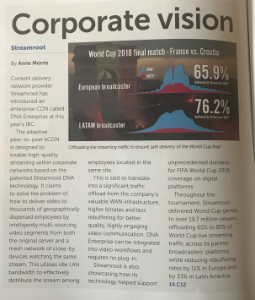
Interestingly, P2P solution are suffering when the internal ISP network is not really good (keeping in mind WebRTC is using UDP and not TCP for transport). India is currently a good example.
Low latency streaming
Wowza Media Systems Co-Founder David Stubenvoll on Battling Latency on the Company’s Legacy is probably a good start to understand the current situation to stream low latency.
DASH CMAF
If you do not know CMAF, Bitmovin is providing a great explanation of CMAF. One of the main goal would be at the end to have HLS (TS chunks) and DASH (MP4 chunks) using the same chunks format, only the manifests will be different (M3U8 for HLS, MPD for DASH). Also CMAF would solve the low latency problem (when sub-seconds chunks are required).
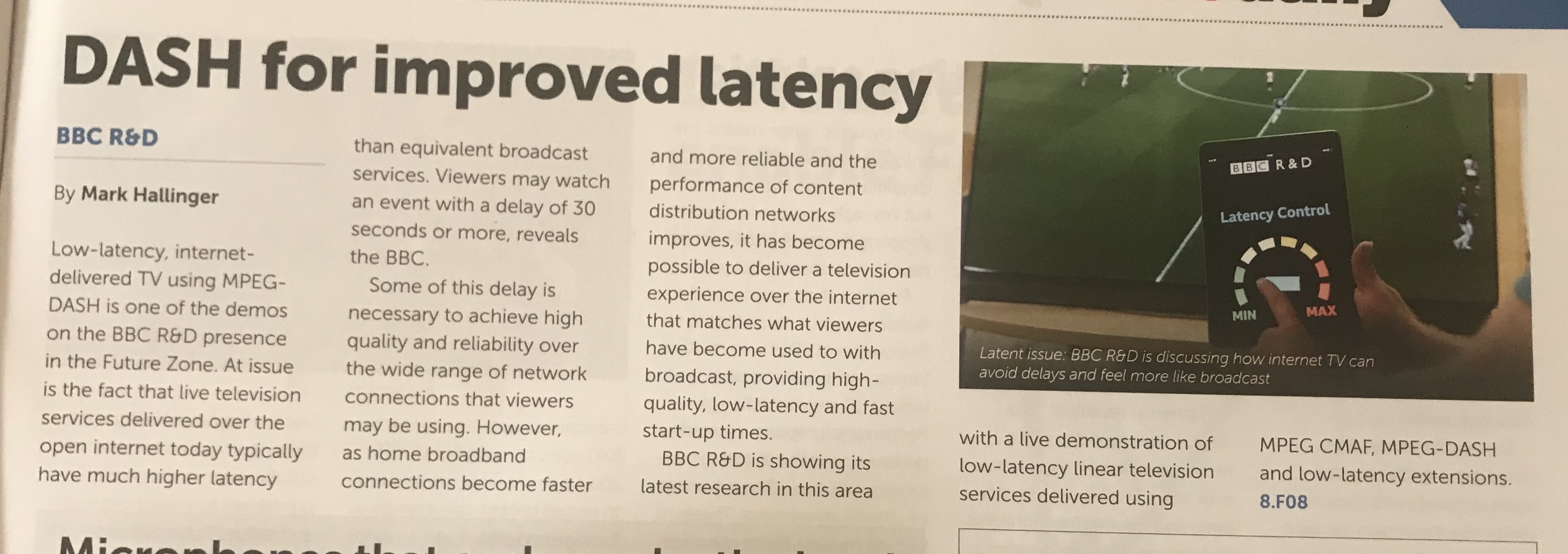
- BBC R&D was exposing during the show the setup their deployed for the last big events : World Cup, Winbledon using MPEG-DASH CMAF for low latency streaming
WebRTC
Limelight Networks released their ultra low latency video product based on WebRTC protocols. The demo @IBC was showing sub second latency from ingest server located (Frankfurt) to edges located in Japan (~800ms) and Los Angeles (~500ms)
Websocket
Some companies which are providing media player are providing also websocket video streaming solution : MistServer, Softvelum (with Nimble Streamer)
nov. 12, 2013
For many companies, especially for broadcasters, there is a common question : how can I de-linearize the live to create VoD contents ? During last IBC, I made a turn of the different tools which can help to create this kind of workflows. Some provides software and others provides appliances. Here is an overview of the different solutions of the company I identified which provide solutions.
Harmonic
Harmonic provides some solutions to generate file from live stream : ProMedia Live server, ProStream 1000 with ACE.
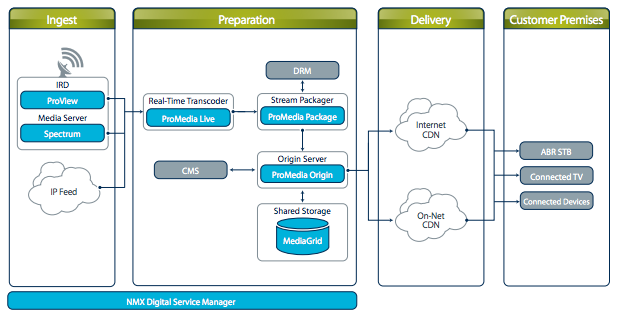
The ProMedia Live can be available as software only or as an appliance (based on optimized hardware). The ProMedia 1000 with ACE is a 1U device.
You can use API or GUI to manage the server and create to order to generate VoD content from Live stream. Both support SDI inputs of HD/SD video or MPEG2 / H.264 via transport stream.
Hexaglobe
 Hexaglobe provided a solution called : Advanced Replay. This solution provides two main features :
- an automatic mode which is pluggable to an EPG for example
- a GUI to create extract scenes from the live
Advanced Replay records the live stream and can be able to provide more than 72hours of recorded streams. The solution is GoP accurate and take as input : TS, RTMP and also SDI.
To finish the solution is provided in a server 1U and can be implemented with others Hexaglobe solutions or with some others solutions (CDN, CMS etc...)
MediaExcel
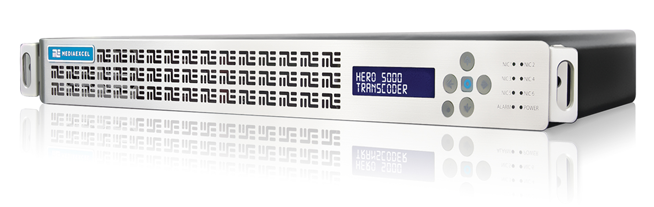
MediaExcel is based in the US. They provide one solution : Media Excel HERO. This platform can manage , on the same one, Live and VoD. MediaExcel provide also 1U servers.
You can scale the platform with the cloud to create a head-end architecture.

"With HERO's on-demand dynamic repurposing for live-to-live, live-to-file, and file-to-file transcoding, no other platform delivers the quality, ease of use, and management capabilities for reducing CAPEX and OPEX." said John Hotchkiss, COO at Media Excel, during last IBC.
OpenHeadEnd
 OpenHeadEnd is a french company. OpenHeadEnd provides a solution based on a simple USB dongle you can plug on a standard PC or a server. Many inputs are possible : from terrestrial reception to IP. The output formats are MPEG2, MPEG4 . You manage the solution via a web interface. Various features are available :
- record live 24H/24H
- capture and recompose a VoD content from recorded live stream
- remux or/and transcode streams
- manage failover (for example if one input failed, the solution use another).
You can have an overview on how to create workflow via the Youtube channel.
Unified Streaming Capture
CodeShop, knew with it main product Unified Streaming, announced last Summer Unified Capture. The solution can be implemented in the Unified Streaming environment.
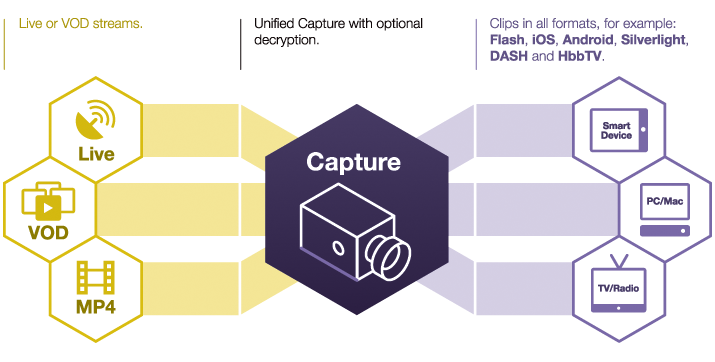
You save your live stream on the disk. Then, you send to Unified Capture (a command-line tool) the TC-in and TC-out to cut and you obtain a single file output. This solution is also frame accurate.
This article give an overview of the different solutions I identified, but perhaps I missed others companies/solutions. If yes, don't hesitate to add a comment in the thread.
nov. 08, 2013
 I will be a speaker (as panelist) in one session during the next Satis expo in Paris. This session is called : "White card to the Online Video French Squad". Online Video French Squad a french group of tech guys who working in the online video ecosystem.
In this session, we will talk about : DRMs, what costs for the OTT security ?
Which DRM for which devices ? Business models, technical constraints, issues on multiscreen workflow and user experience...
The others panelists will be :
- Nicolas Weil, Solution Architect at Akamai
- Simon Laroque, Project Manager at Cognacq-Jay Image
- Philippe Rambourg, Broadcast Engineering Manager at Canal +
The session will be on Wednesday, the 20th of November at 12PM.
To my english readers, I apologize in advance, this session will be in french.
juil. 05, 2013
This post is the result of a sort of challenge. The objective is to create an architecture to generate, manage and deliver HTTP streaming videos using free and/or open-source tools and/or applications. It need to answer to many questions : tools must be open source or free; reliability of the platform and the ability to scale up quickly. The architecture can be split in two parts : the content preparation and the delivery. I will expose an overview for each part of the architecture. Then I will list differents tools you can use. To finish, I will give you in details the architecture I will choose to deploy. But to realize this, few or some developments can be required, the language you will use, will be your choice. The operating system will be on Linux.
Content preparation
Here is the part to prepare the content. It will be separate in 3 differents items, I call them services :
- Manager this service will orchestrate all the tasks. In this part, I choose the self-development but another option is possible (see below).
- Bus the service bus will deliver all messages between others services
- Worker each worker will be in charge of one specific task : encode, upload, download, package.
All of these is exposed in this figure :
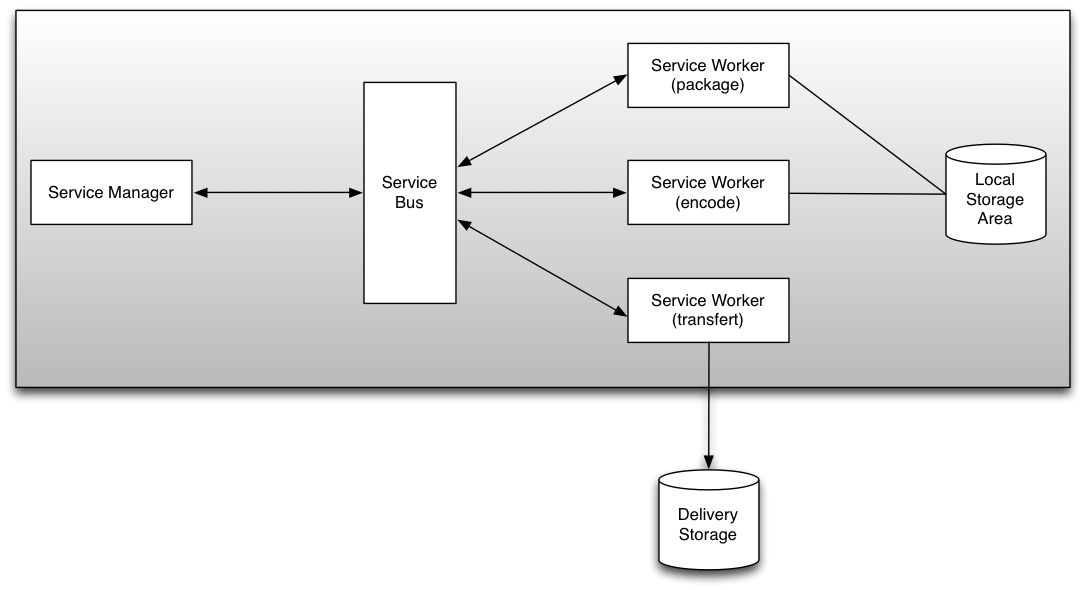
The generated assets are transfered in the delivery zone storage.
Service : Manager
Here is the intelligence of the system. You have two choice :
- create your own system. In this case, the manager need some developments, you can choose the language you want : Python, PHP, NodeJS, Java, Perl, etc...
- using a system already developed. I think about Kaltura platform for example. This option need some integration and learning time if you want to use it.
I recommend to associate your code to a database. The database will save the metadata of your video assets and some configurations datas.
Service : Bus
The service bus will use the concept of Message queue. That is very interesting because it helps to manage more easily the communication between each application : you send the message and the library or the system make the rest. There are many tools in the open source world :
For each message queue solutions, you will find connectors for separates languages (C, C++, PHP, Python, Perl, ...). Depends on the message queue solution you choose, you need to make more or less developments.
Service : Worker
Workers services are here to make specific tasks :
- encode : this service is based on the most famous open source tools in the encoding's world : ffmpeg and its differents libraries (libfaac, libx264, ...). But you can use mencoder too.
- package : the objective is not to encode the video asset, but to change the format. Some tools are available :
- MP4Box : to manage MP4 files or MPEG-DASH
- f4fpackager : to generate HDS, you will need to deploy the HDS module for Apache in the delivery platform
- mediasegmenter : to generate HLS
- FLV2DTSC : to generate DTSC if you want to use MistServer (a solution I told in previous articles).
- transferts : at the end of a process, you will need to transfert the asset to a destination. Transfert workers is able to use some protocols : FTP, SCP, HTTP, etc... So you can push the content to the delivery storage.
All of this services can be in the same physical server. If you have more assets to manage and generate, it is possible very easily to scale up. Workers can be deploy on dedicated server and the bus service is here to manage the network. You can add another service manager to add redundance. Thoses updates will have a impact on the reliability of the platform.
Here is one solution which include the most part of those precepts : Transcodem. You can fork this project on GitHub too.
Delivery
Ok, now your assets are ready to deliver and are in the delivery storage. In our architecture, we want to stream content based on HTTP protocol (HDS, HLS, Smooth Streaming). You can start with one physical server, but all tools and the architecture I expose can scale up easily to many physicals servers. We have many tools to help us :
And if your platform will support a high load, you can use proxy cache solution like Varnish. I gave in a previous post a solution to deliver content with Varnish and MistServer.
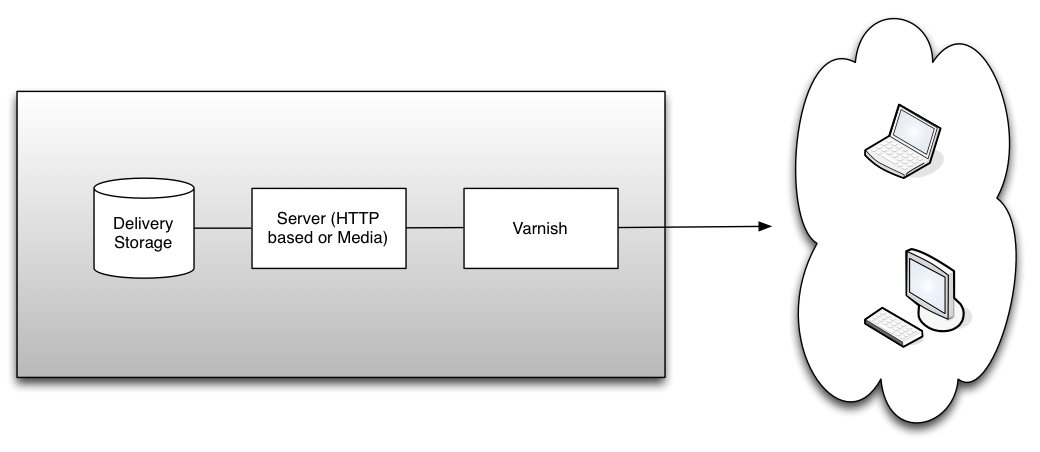
To finish, you can split the two part or merge them in one infrastructure. I am opened to talk about this architecture and which tools we can use to deploy it.
juil. 04, 2013
 Everybody knows ffmpeg the command line encoding tool but do you know ffserver ? ffserver is a multimedia streaming server for live broadcasts. With it, you can stream over HTTP, RTP and RSTP.
Quick overview
The concept is to use ffmpeg to push content to one server. This server will transcode streams and deliver to the end-users.
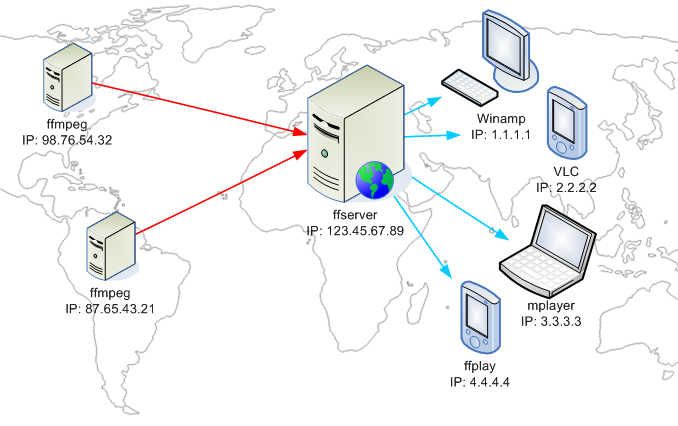
Input streams are called feed and for each feed you can have multiple output stream.
We can manage ffserver via a configuration file. The syntax is close to the one used for Apache server. You can find a example here. And there are more informations in the ffserver wiki.
We will see two examples on how to deliver content via a ffserver. There will be a FLV and a WebM stream.
Stream FLV
In this example, we will have one input stream and two output : one in FLV and one WebM.
Here are the general configuration settings
[code language="text"]
Port 8090
BindAddress 0.0.0.0
MaxHTTPConnections 2000
MaxClients 1000
MaxBandwidth 1000
CustomLog -
[/code]
We define a status page.
[code language="text"]
\<Stream stat.html>
Format status
ACL allow localhost
ACL allow 192.168.0.0 192.168.255.255
\</Stream>
[/code]
This page will help us to monitor the server. This page is call with this url : http://localhost:8090/stat.html and you will get this page :
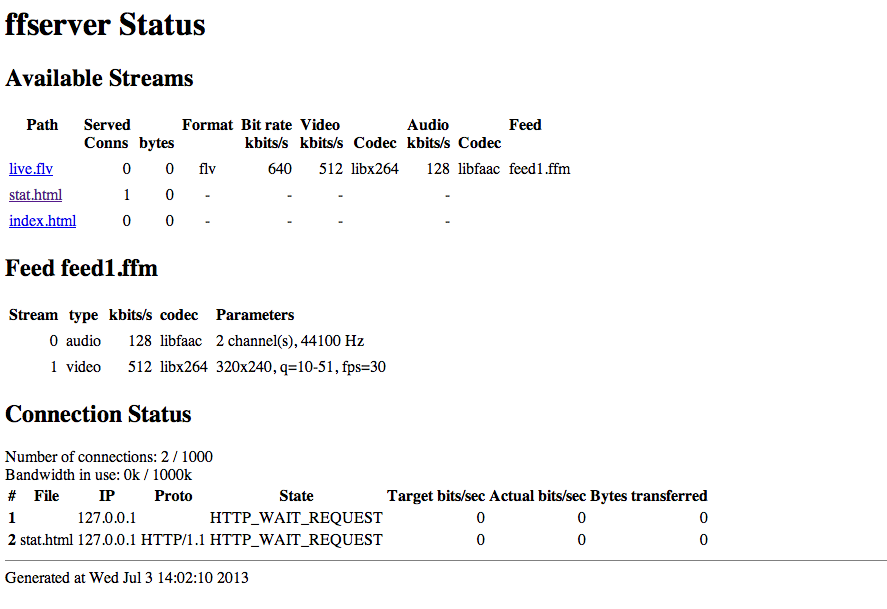
Now we set up the feed : storage area, max size and allowed referrers. Remember, feeds are the input of the ffserver.
[code language="text"]
\<Feed feed1.ffm>
File /tmp/feed1.ffm
FileMaxSize 1G
ACL allow 127.0.0.1
\</Feed>
[/code]
Ok, our configuration file have now a input feed. Now, we will add the first output : the FLV one. The video will be encoded in H264 for video and AAC for audio. This part is divided in 3 part :
- general settings : which feed is used and output format
- settings for video
- settings for audio
[code language="text"]
\<Stream live.flv>
Format flv
Feed feed1.ffm
VideoCodec libx264
VideoFrameRate 30
VideoBitRate 800
VideoSize 720x576
AVOptionVideo crf 23
AVOptionVideo preset medium
AVOptionVideo me_range 16
AVOptionVideo qdiff 4
AVOptionVideo qmin 10
AVOptionVideo qmax 51
AVOptionVideo flags +global_header
AudioCodec aac
Strict -2
AudioBitRate 128
AudioChannels 2
AudioSampleRate 44100
AVOptionAudio flags +global_header
\</Stream>
[/code]
The first part of our server is now configured and saved in a ffserver.conf file. We can test it. Launch the server with this command line :
[code language="bash"]ffserver -f ffserver.conf[/code]
You will have this output :
[code language="bash"] ffserver version 1.2.1 Copyright (c) 2000-2013 the FFmpeg developers
built on Jun 24 2013 10:41:49 with Apple clang version 4.1 (tags/Apple/clang-421.11.65) (based on LLVM 3.1svn)
configuration: --prefix=/opt/local --enable-swscale --enable-avfilter --enable-libmp3lame --enable-libvorbis --enable-libopus --enable-libtheora --enable-libschroedinger --enable-libopenjpeg --enable-libmodplug --enable-libvpx --enable-libspeex --enable-libass --enable-libbluray --enable-gnutls --enable-libfreetype --mandir=/opt/local/share/man --enable-shared --enable-pthreads --cc=/usr/bin/clang --arch=x86_64 --enable-yasm --enable-gpl --enable-postproc --enable-libx264 --enable-libxvid --enable-nonfree --enable-libfaac
libavutil 52. 18.100 / 52. 18.100
libavcodec 54. 92.100 / 54. 92.100
libavformat 54. 63.104 / 54. 63.104
libavdevice 54. 3.103 / 54. 3.103
libavfilter 3. 42.103 / 3. 42.103
libswscale 2. 2.100 / 2. 2.100
libswresample 0. 17.102 / 0. 17.102
libpostproc 52. 2.100 / 52. 2.100
Wed Jul 3 14:02:01 2013 FFserver started.
[/code]
Your server is now up and running. We can push our first movie, in my case, I use the Sintel Movie trailer. The ffmpeg command line read the video and push it to the feed we configured above.
[code language="bash"][/code]ffmpeg -i sintel.mp4 http://localhost:8090/feed1.ffm[/code]
Now you can launch your preferred player (in my case VLC) and try to stream the content : http://localhost:8090/live.flv ;-)
Stream WebM
Ok we have now one FLV output stream. We will replace FLV stream by one new output : WebM (with Vorbis and VP6). We will re-used the ffserver.conf file and put this part :
[code language="text"]
\<Stream live.webm>
Feed feed1.ffm
Format webm
AudioCodec vorbis
AudioBitRate 64
VideoCodec libvpx
VideoSize 720x576
VideoFrameRate 25
AVOptionVideo flags +global_header
AVOptionVideo cpu-used 0
AVOptionVideo qmin 10
AVOptionVideo qmax 42
AVOptionVideo quality good
AVOptionAudio flags +global_header
PreRoll 15
StartSendOnKey
VideoBitRate 400
\</Stream>
[/code]
Restart the server and push again the content. You can test the movie on Chrome or VLC with this url : http://localhost:8090/live.webm
Note: with WebM, you can create a kind of live stream if you loop on different ffmpeg command line.
To conclude, we know ffmpeg as one of the most useful free encoder. Now, ffserver is a very interesting tool and deserve more time to test the different possibility of it.
Have fun with it ! ;-)
avril 18, 2013
In the previous post, we looked the new features of MistServer (version 1.1).
 Today, I expose an idea exposed by a friend Nicolas Weil. We talked about the content caching for an architecture based on Mistserver especially for HTTP based format. We thought about Varnish, an HTTP accelerator. The idea is to keep in cache the different fragments which are generated by MistServer. This article will not talk about the RTMP or TS part, theses protocols are not HTTP based.
To make this test, I use on the same server MistServer and Varnish. Here is the architecture.
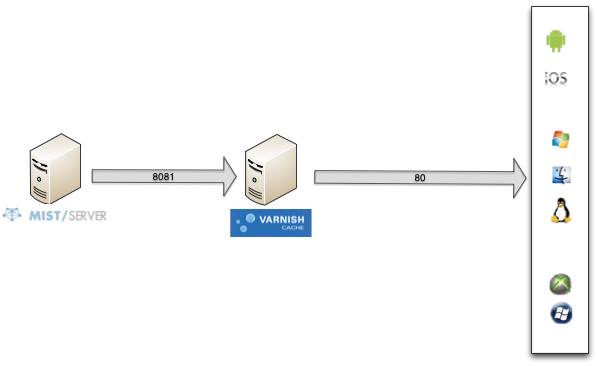
As you look, my Mistserver HTTP based protocols are on 8081 port. The operating system is Ubuntu and I follow this tutorial to install Varnish. Then I setup Varnish and fill which is his backend. Open the /etc/varnish/default.vcl and update thoses lines :
backend default {
    .host = "127.0.0.1";
    .port = "8081";
}
sub vcl_recv {
    set req.grace = 30s;
    return (lookup);
}
sub vcl_pipe {
    return (pipe);
}
sub vcl_pass {
    return (pass);
}
sub vcl_init {
    return (ok);
}
sub vcl_fini {
    return (ok);
}
sub vcl_deliver {
        if (obj.hits > 0) {
                set resp.http.X-Cache = "cached";
        } else {
                set resp.http.X-Cache = "uncached";
        }
        return (deliver);
}
To help on debug, I add in vcl_deliver a X-Cache header with values cached - uncached. HTTP files will be in cache during 30 seconds. You can change the value very easier.
You can optimize the configuration but it's not the object of that article and you can find many informations on the web.
To check the good configuration, get a content with curl command line. Be careful, we are not testing to call the MistServer but the Varnish cache, so we will point to the port 80 not 8081.
$ curl -I http://ip_address/dynamic/mystream/manifest.f4m
Check the HTTP header :
HTTP/1.1 200 OK
Cache-Control: no-cache
Content-Type: text/xml
X-UID: 0f4405cc8b4b43312a8f35d7ba0b043e_sintel_dynamic
Content-Length: 815
Accept-Ranges: bytes
Date: Thu, 11 Apr 2013 14:30:19 GMT
Age: 0
Connection: keep-alive
X-Cache: uncached
You can see the uncached value on the last line.
If you make a new call, before the end of the 30s of cache, the content will be in Varnish cache and MistServer is not called :
HTTP/1.1 200 OK
Cache-Control: no-cache
Content-Type: text/xml
X-UID: 0f4405cc8b4b43312a8f35d7ba0b043e_sintel_dynamic
Content-Length: 815
Accept-Ranges: bytes
Date: Thu, 11 Apr 2013 14:30:21 GMT
Age: 2
Connection: keep-alive
X-Cache: cached
This is the magic of HTTP caching ! ;-) Mistserver is not used when content is cached by Varnish.
You can check too with the varnishlog tools to see if Varnish call the backend or not.
If you want to use this kind of configuration for production for example, you can apply this kind of architecture : multiple varnish caches (called edges), as physical servers, in front of Mistserver (called origin).
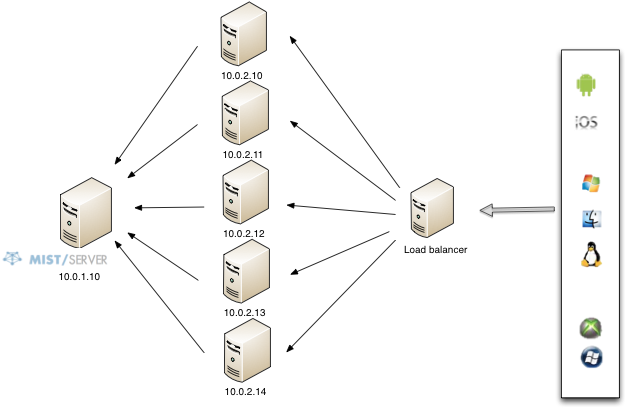
You can divide by many the load on the origin server and Varnish was created for this kind of usage.
To finish, you can apply this kind of configuration for VoD or Live. For VoD, the cache lifetime can be more than 10 minutes, for live, I advise a short cache lifetime, the reason are simple to understand.
Have fun !
avril 11, 2013
 I made last year a post to introduce a new streaming server : MistServer. From this article, I follow all the updates made by the team. The DDVTech team released the server in version 1.1 the 31th March. The changelog is available too.
Some important formats were updated in this new version : HLS and Smooth Streaming, HTTP Progressive. They added too MPEG TS protocol. The interface get some updates too for a better management. And the most important, the server gets many improvements.
The interface
The main update on the interface is for the protocol section. The Limits are now only available in the LTS (you need to buy it, but it's only 299€).
The list of the protocols available is more cleanest.
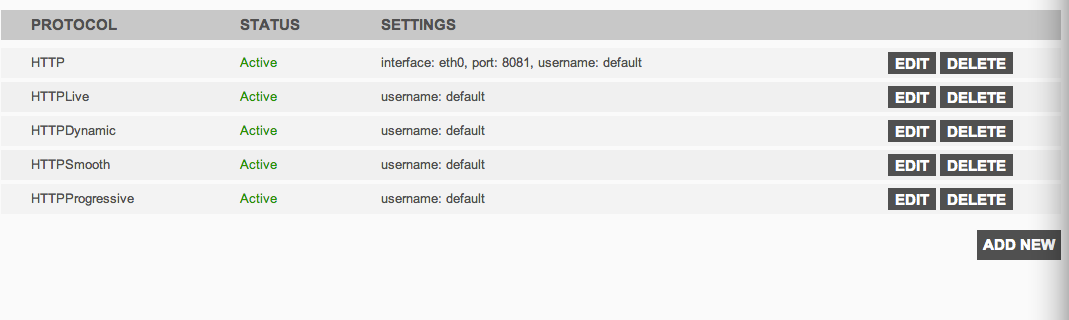
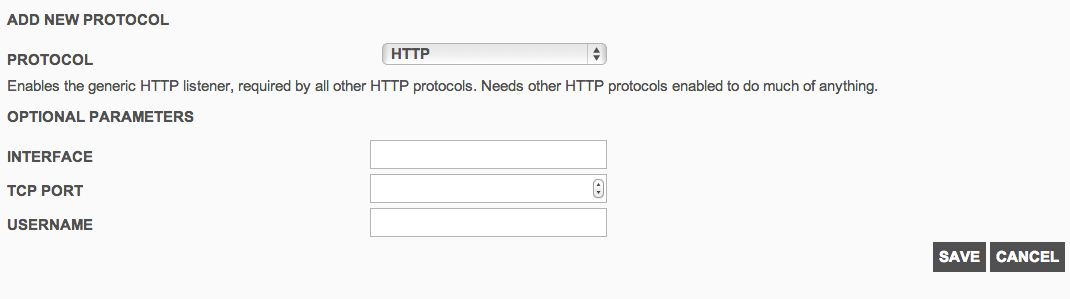
To add or edit a protocol, you will get a specific form. You can choose HTTP or HTTP based protocol, RTMP and TS. We will see the different protocols below.
 Formats supported
In this version, new formats are now supported or the performance to deliver was improved. MistServer interface is very easy to use and manage if you want to make a try. For the HTTP based protocol, you need to create first a HTTP protocol on a specific interface and port.
HTTP Dynamic Streaming
This format was already available in previous version, but the template of the url changed :
http://[ip_address]:[port]/dynamic/[stream_name]/manifest.f4m
You can test the content with an OSMF player.
HTTP Smooth Streaming
The Microsoft's protocol works now well with the last version. I tested it 3 months ago but the video doesn't stream well (lags, buffering, etc...). It's now fixed.
http://[ip_address]:[port]/smooth/[stream_name].ism/Manifest
Here is a distant Smooth player
HTTP Live Streaming
This format is used by the iOS devices (iPhone / iPad / iPod) and by some Android devices.
http://[ip_address]:[port]/hls/[stream_name]/index.m3u8
You can test your content with an Quicktime player or a VLC player.
This format is currently in progress. The dev team is improving the performance of this format.
HTTP Progressive
With MistServer, you can deliver too the content via HTTP Progressive download. You just need to call the movie as a FLV file or MP3 file (for audio only).
http://[ip_address]:[port]/[stream_name].flv
http://[ip_address]:[port]/[stream_name].mp3
You can read flv with a Flash based player. Or, I read a specific trick (on Mist mailing list) for Android, you just make a \<a> link pointing to the flv. Android detects MimeType and suggests one of the player.
RTMP
RTMP is a format provided by Adobe. You can read RTMP stream with some players.
In MistServer interface, add a new protocol RTMP. By default, the port is 1935.
rtmp://[server]:[port]/*/[streamname]
TS
As the CTO of DDVTech told me, TS is a raw stream. You can deliver a single stream once you are connected to. In the interface, you need to provide which stream you want to deliver.
You can try the stream with VLC for example.
To conclude, this version makes available some good functionalities and the team help us quickly on the different communication channels (GoogleGroup, IRC). To avoid the load, we can make some optimization in the architecture based on Mist. We will see it in a next post. Have fun when you test it !
Update 18/04/2013 : DDVTech published a version 1.1.1 with some bug fixes (changelog).
mars 08, 2013
A new small blog post where I sticked informations or links about Rest and Restful :a style of architecture for distributed softwares. This post will be updated each time I have new links.
Restful is stateless. The main goals of Restful architecture are scalability, availability and agnotiscs technologies between software (via an common interface). A new Internet draft is out, it names RESTful Authentication Pattern and will help to design your architecture.
If you will deploy this type of architecture, you can read this slideshare which give best practices to design API (a webinar is available too). To design a Restful architecture, you need to design your URI. There is another good document made by Apigee : Web API Design - Crafting interfaces that Developers love [PDF file]
Here is some examples of API architectures:
To conclude, there is a tool to assist you on your development : Rest-client. It's a Java app (so cross-platform) to test your Restful webservices.
févr. 12, 2013
The beginning of this year 2013 is full of news in the transcoding cloud world. The two main platforms announced the release of their own solutions :
I made some posts to introduce Azure Media Services (part 1, part 2) available after May 2012. Here is a quick overview to compare those different services.
Platform Models
Here is a quick overview of each platform models.
Amazon Elastic Transcoding
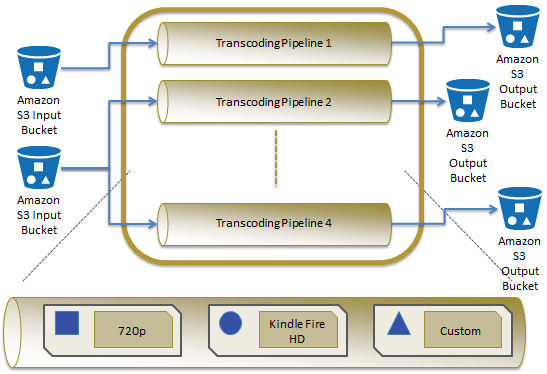
Azure Media Services
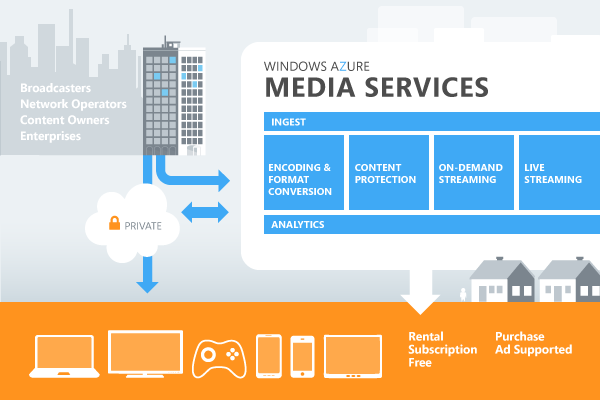
Functionnalities
This table exposes the differents features supported by each solutions.
[table id=3 /]
Both solutions give the opportunity to create our own presets but there are also some generic presets available : for iDevices, for mobiles, generic profiles for SD and HD.
Pricing
Each cloud company applies its own pricing, not based on the same parameters.

On Amazon side, the price is based on output content duration. You have two prices :
- for Standard resolution (less than 720p) : 0,072€ per minute
- for HD (more than 720p) : cost of SD x 2 per minute
 Microsoft, on the other side, applies on Azure Media Service a pricing on encoded GigaBytes processed. They count input and output datas. The pricing begins at 1,99\$ by GigaBytes up to 5TeraBytes / Month. It reduces when you use more the service. This prices don't include the storage on Amazon S3 or Azure Storage.
To choose the good one, you need to make a table to compare, it depends of your usage. I will try soon to expose one or more architectures based on those two services to manage video assets. So keep in touch ;-)
janv. 18, 2013

The Amazon Web Services re:Invent conference was done in last November at Las Vegas. There was some talks about different applications or different usage of the cloud solution provide by Amazon. I selected 3 of them which can be very interesting and talked about the media processing : the Netflix architecture, how to scale, etc...
Netflix’s Transcoding Transformation
Scalable Media Processing
Addressing Security in Media Workflows