juil. 05, 2013
This post is the result of a sort of challenge. The objective is to create an architecture to generate, manage and deliver HTTP streaming videos using free and/or open-source tools and/or applications. It need to answer to many questions : tools must be open source or free; reliability of the platform and the ability to scale up quickly. The architecture can be split in two parts : the content preparation and the delivery. I will expose an overview for each part of the architecture. Then I will list differents tools you can use. To finish, I will give you in details the architecture I will choose to deploy. But to realize this, few or some developments can be required, the language you will use, will be your choice. The operating system will be on Linux.
Content preparation
Here is the part to prepare the content. It will be separate in 3 differents items, I call them services :
- Manager this service will orchestrate all the tasks. In this part, I choose the self-development but another option is possible (see below).
- Bus the service bus will deliver all messages between others services
- Worker each worker will be in charge of one specific task : encode, upload, download, package.
All of these is exposed in this figure :
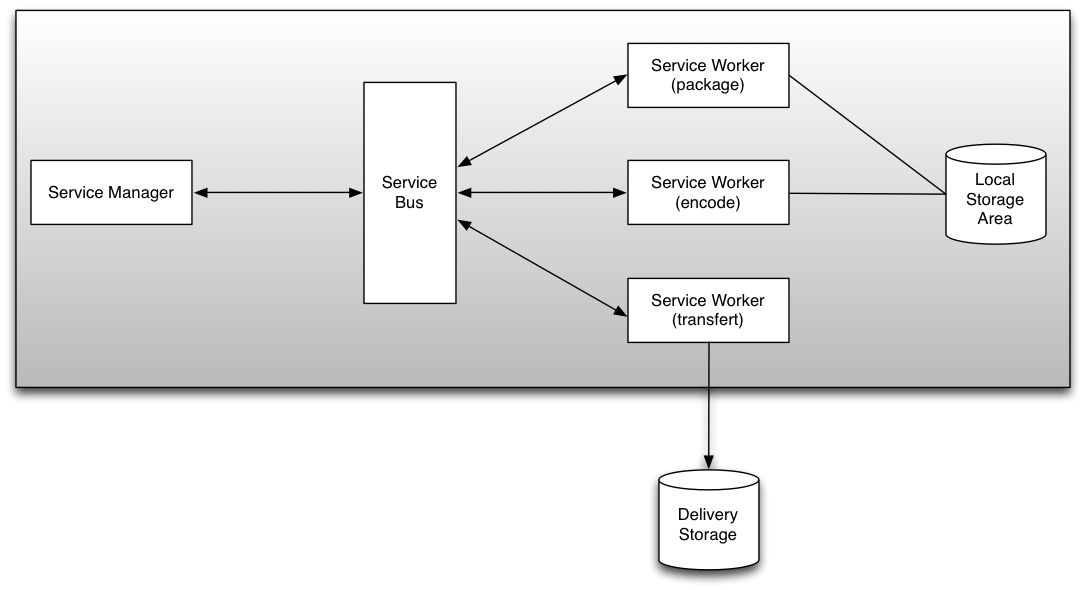
The generated assets are transfered in the delivery zone storage.
Service : Manager
Here is the intelligence of the system. You have two choice :
- create your own system. In this case, the manager need some developments, you can choose the language you want : Python, PHP, NodeJS, Java, Perl, etc...
- using a system already developed. I think about Kaltura platform for example. This option need some integration and learning time if you want to use it.
I recommend to associate your code to a database. The database will save the metadata of your video assets and some configurations datas.
Service : Bus
The service bus will use the concept of Message queue. That is very interesting because it helps to manage more easily the communication between each application : you send the message and the library or the system make the rest. There are many tools in the open source world :
For each message queue solutions, you will find connectors for separates languages (C, C++, PHP, Python, Perl, ...). Depends on the message queue solution you choose, you need to make more or less developments.
Service : Worker
Workers services are here to make specific tasks :
- encode : this service is based on the most famous open source tools in the encoding's world : ffmpeg and its differents libraries (libfaac, libx264, ...). But you can use mencoder too.
- package : the objective is not to encode the video asset, but to change the format. Some tools are available :
- MP4Box : to manage MP4 files or MPEG-DASH
- f4fpackager : to generate HDS, you will need to deploy the HDS module for Apache in the delivery platform
- mediasegmenter : to generate HLS
- FLV2DTSC : to generate DTSC if you want to use MistServer (a solution I told in previous articles).
- transferts : at the end of a process, you will need to transfert the asset to a destination. Transfert workers is able to use some protocols : FTP, SCP, HTTP, etc... So you can push the content to the delivery storage.
All of this services can be in the same physical server. If you have more assets to manage and generate, it is possible very easily to scale up. Workers can be deploy on dedicated server and the bus service is here to manage the network. You can add another service manager to add redundance. Thoses updates will have a impact on the reliability of the platform.
Here is one solution which include the most part of those precepts : Transcodem. You can fork this project on GitHub too.
Delivery
Ok, now your assets are ready to deliver and are in the delivery storage. In our architecture, we want to stream content based on HTTP protocol (HDS, HLS, Smooth Streaming). You can start with one physical server, but all tools and the architecture I expose can scale up easily to many physicals servers. We have many tools to help us :
And if your platform will support a high load, you can use proxy cache solution like Varnish. I gave in a previous post a solution to deliver content with Varnish and MistServer.
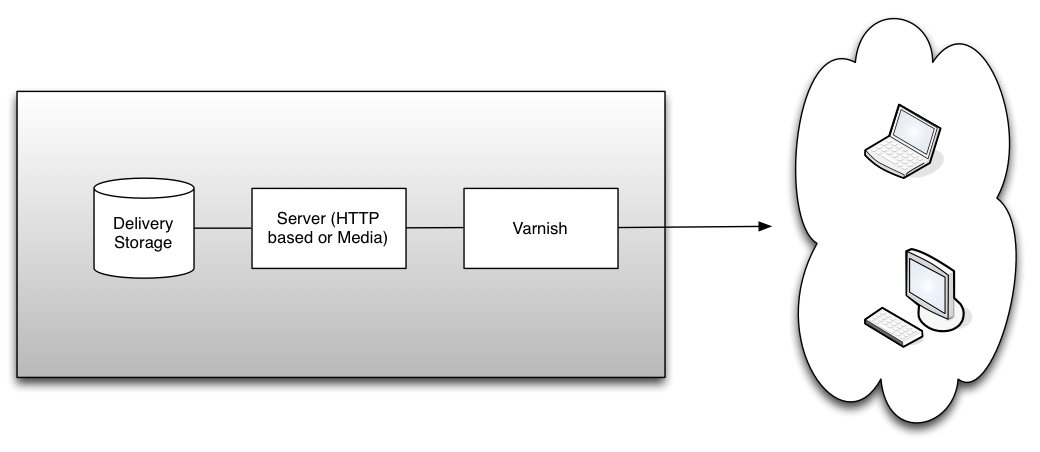
To finish, you can split the two part or merge them in one infrastructure. I am opened to talk about this architecture and which tools we can use to deploy it.
avril 18, 2013
In the previous post, we looked the new features of MistServer (version 1.1).
 Today, I expose an idea exposed by a friend Nicolas Weil. We talked about the content caching for an architecture based on Mistserver especially for HTTP based format. We thought about Varnish, an HTTP accelerator. The idea is to keep in cache the different fragments which are generated by MistServer. This article will not talk about the RTMP or TS part, theses protocols are not HTTP based.
To make this test, I use on the same server MistServer and Varnish. Here is the architecture.
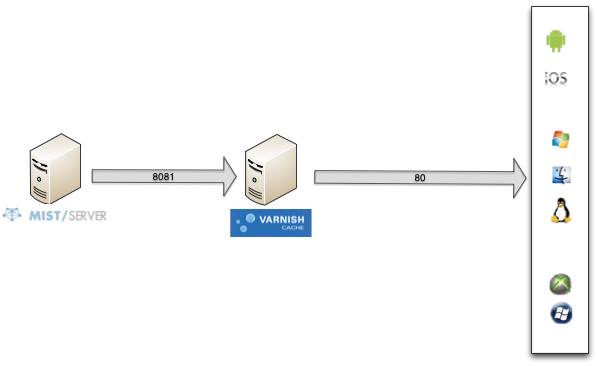
As you look, my Mistserver HTTP based protocols are on 8081 port. The operating system is Ubuntu and I follow this tutorial to install Varnish. Then I setup Varnish and fill which is his backend. Open the /etc/varnish/default.vcl and update thoses lines :
backend default {
    .host = "127.0.0.1";
    .port = "8081";
}
sub vcl_recv {
    set req.grace = 30s;
    return (lookup);
}
sub vcl_pipe {
    return (pipe);
}
sub vcl_pass {
    return (pass);
}
sub vcl_init {
    return (ok);
}
sub vcl_fini {
    return (ok);
}
sub vcl_deliver {
        if (obj.hits > 0) {
                set resp.http.X-Cache = "cached";
        } else {
                set resp.http.X-Cache = "uncached";
        }
        return (deliver);
}
To help on debug, I add in vcl_deliver a X-Cache header with values cached - uncached. HTTP files will be in cache during 30 seconds. You can change the value very easier.
You can optimize the configuration but it's not the object of that article and you can find many informations on the web.
To check the good configuration, get a content with curl command line. Be careful, we are not testing to call the MistServer but the Varnish cache, so we will point to the port 80 not 8081.
$ curl -I http://ip_address/dynamic/mystream/manifest.f4m
Check the HTTP header :
HTTP/1.1 200 OK
Cache-Control: no-cache
Content-Type: text/xml
X-UID: 0f4405cc8b4b43312a8f35d7ba0b043e_sintel_dynamic
Content-Length: 815
Accept-Ranges: bytes
Date: Thu, 11 Apr 2013 14:30:19 GMT
Age: 0
Connection: keep-alive
X-Cache: uncached
You can see the uncached value on the last line.
If you make a new call, before the end of the 30s of cache, the content will be in Varnish cache and MistServer is not called :
HTTP/1.1 200 OK
Cache-Control: no-cache
Content-Type: text/xml
X-UID: 0f4405cc8b4b43312a8f35d7ba0b043e_sintel_dynamic
Content-Length: 815
Accept-Ranges: bytes
Date: Thu, 11 Apr 2013 14:30:21 GMT
Age: 2
Connection: keep-alive
X-Cache: cached
This is the magic of HTTP caching ! ;-) Mistserver is not used when content is cached by Varnish.
You can check too with the varnishlog tools to see if Varnish call the backend or not.
If you want to use this kind of configuration for production for example, you can apply this kind of architecture : multiple varnish caches (called edges), as physical servers, in front of Mistserver (called origin).
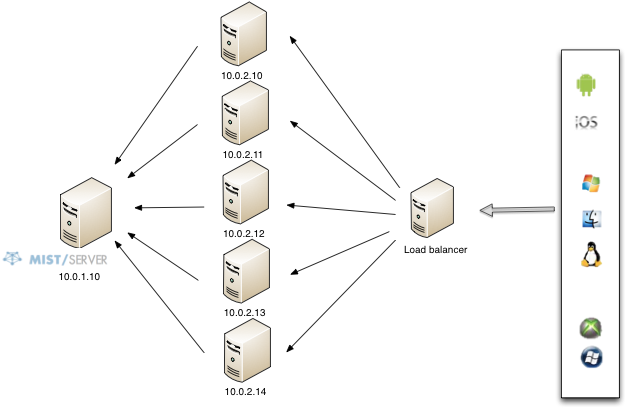
You can divide by many the load on the origin server and Varnish was created for this kind of usage.
To finish, you can apply this kind of configuration for VoD or Live. For VoD, the cache lifetime can be more than 10 minutes, for live, I advise a short cache lifetime, the reason are simple to understand.
Have fun !
avril 11, 2013
 I made last year a post to introduce a new streaming server : MistServer. From this article, I follow all the updates made by the team. The DDVTech team released the server in version 1.1 the 31th March. The changelog is available too.
Some important formats were updated in this new version : HLS and Smooth Streaming, HTTP Progressive. They added too MPEG TS protocol. The interface get some updates too for a better management. And the most important, the server gets many improvements.
The interface
The main update on the interface is for the protocol section. The Limits are now only available in the LTS (you need to buy it, but it's only 299€).
The list of the protocols available is more cleanest.
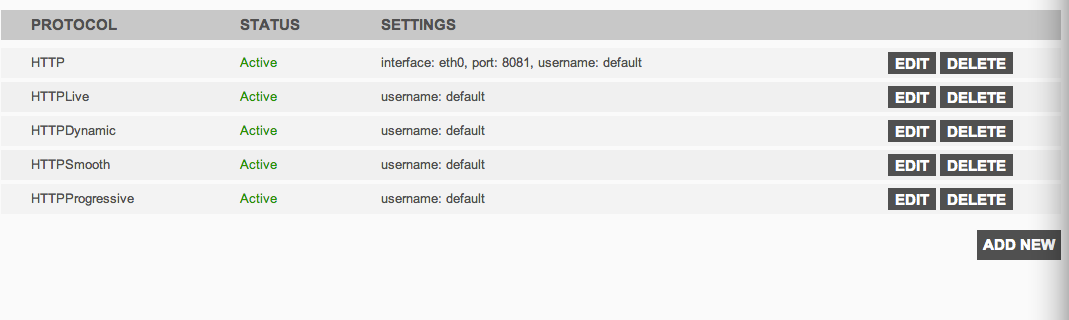
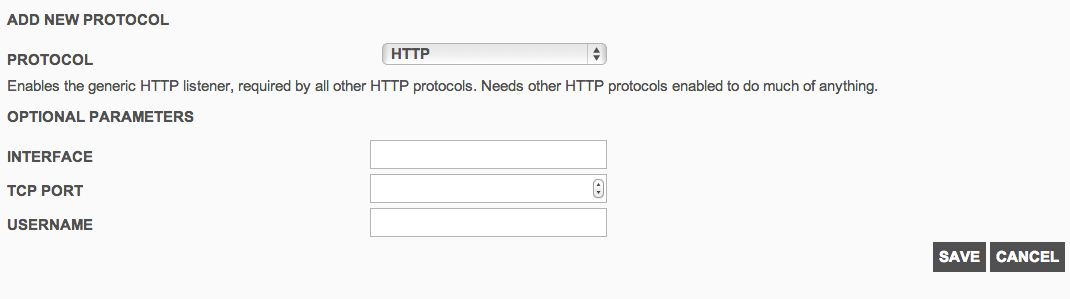
To add or edit a protocol, you will get a specific form. You can choose HTTP or HTTP based protocol, RTMP and TS. We will see the different protocols below.
 Formats supported
In this version, new formats are now supported or the performance to deliver was improved. MistServer interface is very easy to use and manage if you want to make a try. For the HTTP based protocol, you need to create first a HTTP protocol on a specific interface and port.
HTTP Dynamic Streaming
This format was already available in previous version, but the template of the url changed :
http://[ip_address]:[port]/dynamic/[stream_name]/manifest.f4m
You can test the content with an OSMF player.
HTTP Smooth Streaming
The Microsoft's protocol works now well with the last version. I tested it 3 months ago but the video doesn't stream well (lags, buffering, etc...). It's now fixed.
http://[ip_address]:[port]/smooth/[stream_name].ism/Manifest
Here is a distant Smooth player
HTTP Live Streaming
This format is used by the iOS devices (iPhone / iPad / iPod) and by some Android devices.
http://[ip_address]:[port]/hls/[stream_name]/index.m3u8
You can test your content with an Quicktime player or a VLC player.
This format is currently in progress. The dev team is improving the performance of this format.
HTTP Progressive
With MistServer, you can deliver too the content via HTTP Progressive download. You just need to call the movie as a FLV file or MP3 file (for audio only).
http://[ip_address]:[port]/[stream_name].flv
http://[ip_address]:[port]/[stream_name].mp3
You can read flv with a Flash based player. Or, I read a specific trick (on Mist mailing list) for Android, you just make a \<a> link pointing to the flv. Android detects MimeType and suggests one of the player.
RTMP
RTMP is a format provided by Adobe. You can read RTMP stream with some players.
In MistServer interface, add a new protocol RTMP. By default, the port is 1935.
rtmp://[server]:[port]/*/[streamname]
TS
As the CTO of DDVTech told me, TS is a raw stream. You can deliver a single stream once you are connected to. In the interface, you need to provide which stream you want to deliver.
You can try the stream with VLC for example.
To conclude, this version makes available some good functionalities and the team help us quickly on the different communication channels (GoogleGroup, IRC). To avoid the load, we can make some optimization in the architecture based on Mist. We will see it in a next post. Have fun when you test it !
Update 18/04/2013 : DDVTech published a version 1.1.1 with some bug fixes (changelog).
janv. 04, 2013
 To begin this new year, I make this post on a subject which can introduce misunderstandings. Previously, Adobe named it streaming server : Flash Media Server (aka FMS) v4.5. In october 2012, Adobe release a new version and recalled the server: Adobe Media Server (aka AMS) v5.0.1. Some acronym used in FMS are the same in AMS, but this is not the same "products" (e.g. PHLS). In this post, I will give some input on live streaming format and especially about security applied on.
HTTP Dynamic Streaming (HDS)
Adobe Media Server is abled to stream (and so repack) 3 HDS formats :
HTTP Dynamic Streaming (HDS)
This is the common HDS format created by Adobe. A HDS content contains 1 XML based manifest file (.f4m), 1 index file (.f4x) and 1 file contained the fragments (.f4f).
Protected HTTP Dynamic Streaming (PHDS)
PHDS adds encryption on the content without using a DRM system like Adobe Access. The content is only encrypted, there is no right management.
To improve your security, you can use too SWF verification. One or more players are declared in a whitelist on the server and only this players can stream contents.
HTTP Dynamic Streaming associate to Adobe Access
To apply some rights on your content, you apply some rules via a DRM system. The Adobe Access license server is optimized to use with HDS. You need to declare on the server some informations from the license server and which DRM policy you want to use.
HTTP Live Streaming (HLS)
In a previous post, I talked on the Flash Media Server 4.5 setup, to be more precise on PHLS setup. There is a big difference, so here, forget the formats in FMS ;-) Adobe Media Server is abled to stream 4 HLS formats. The first is the common HLS and 3 others.
Vanilla
In AMS, Vanilla is the HLS format with an AES-128 encryption applied on the content. You can stream the content with all Quicktime based players (like the player on iOS devices).
Protected HTTP Live Streaming (PHLS)
Here is the main difference between PHLS on FMS and PHLS in AMS. In FMS, PHLS is the HLS with AES. In AMS, PHLS is an encryption on your content without using a DRM system.
HTTP Live Streaming associate to Adobe Access
Like HDS with Adobe Access, you can apply a full DRM solution on HLS. Please notice, this functionality is only available with Adobe Access v4.
For the two last formats, the content can only be streamed by a specific player provided by Adobe.
To finish, when you read the documentation on Adobe developer website, be careful you read the doc related to the good version of the streaming server. Some link in AMS 5.0 reported to the FMS 4.5 ;-)
déc. 10, 2012
Mistserver is a open-source multimedia streaming server developed by DDVTech a company based in Netherlands. This server will support some technologies : HLS, HDS, Smooth Streaming, RTMP, ...
For the moment, HDS, RTMP and progressive download are available. You can push too livestream via RMTP. The company have two others solutions : MistSteward, MistCenter.
DDVTech positions his solution in a competitive market with some actors : Adobe Media Server, Wowza, Red5, Apache, ...
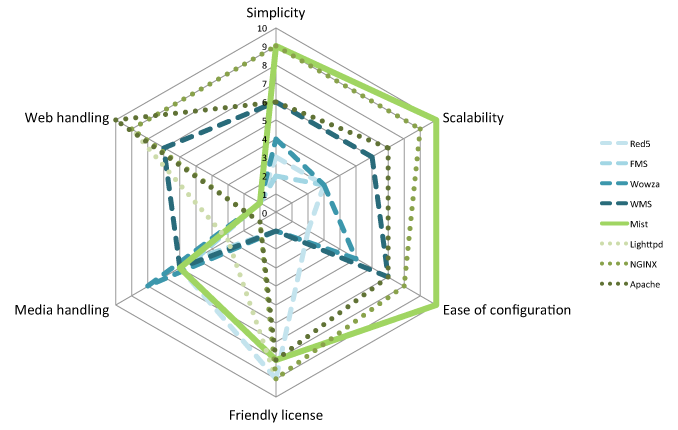
The solution is open-source so the source code is available on GitHub.
The main idea, in the server architecture, is to have a specific process for each viewer. The main concept design is modularity via some Server API.
For this first quick overview, I use a Virtual Machine based on Ubuntu 64bits. In the download section of the site, you have some statics binaries. In my case, I compile the library and the server. You need to install some packages before, if they are not already installed :
apt-get install pkg-config openssl-dev g++
Then, just follow the QuickStart page. When it's finished, have a look on administration home page.
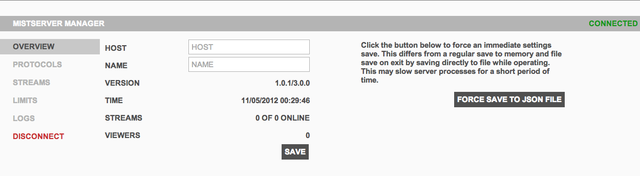 Ok, now I will stream a VoD content. To do that, you need to use a FLV file (named here movie.flv). Please take care when you use the commandline MistFLV2DTSC : you need to have the \< > in your command. The video is piped in the MistFLV2DTSC and then output in the dtsc file.
MistFLV2DTSC < movie.flv > movie.dtsc
MistDTSCFix movie.dtsc
Now, add your content in the administration portal. Go in Protocols and add a new one. You can add 2 types of protocols : HTTP or RTMP and associate it to a port. The interface is the network interface you want to use.
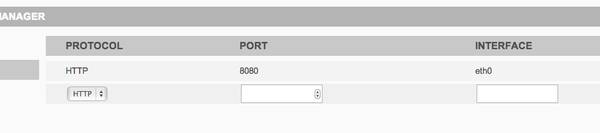
Ok, so your server is set-up to stream file on HTTP and port 8080. Without adding one protocol, you can't be able to stream a content.
Now, add our video (the movie.flv file). Go in Stream, fill a name and a source (the location of the file in the server). 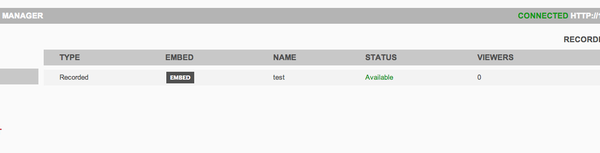 You will see in the server log (available via the Administration interface or via shell)
After few moment, the status updates to Available. You can now preview the content, click on Embed then Preview.
To finish, you can access to your content via differents url for the differents protocols :
- for FLV : http://server_address:port/movie.flv
- for F4m : http://server_address:port/movie/manifest.f4m
Next step is to set-up a live stream and playing with the server, but this is for another post ;-)
Update 12th April 2013 : Release of version 1.1